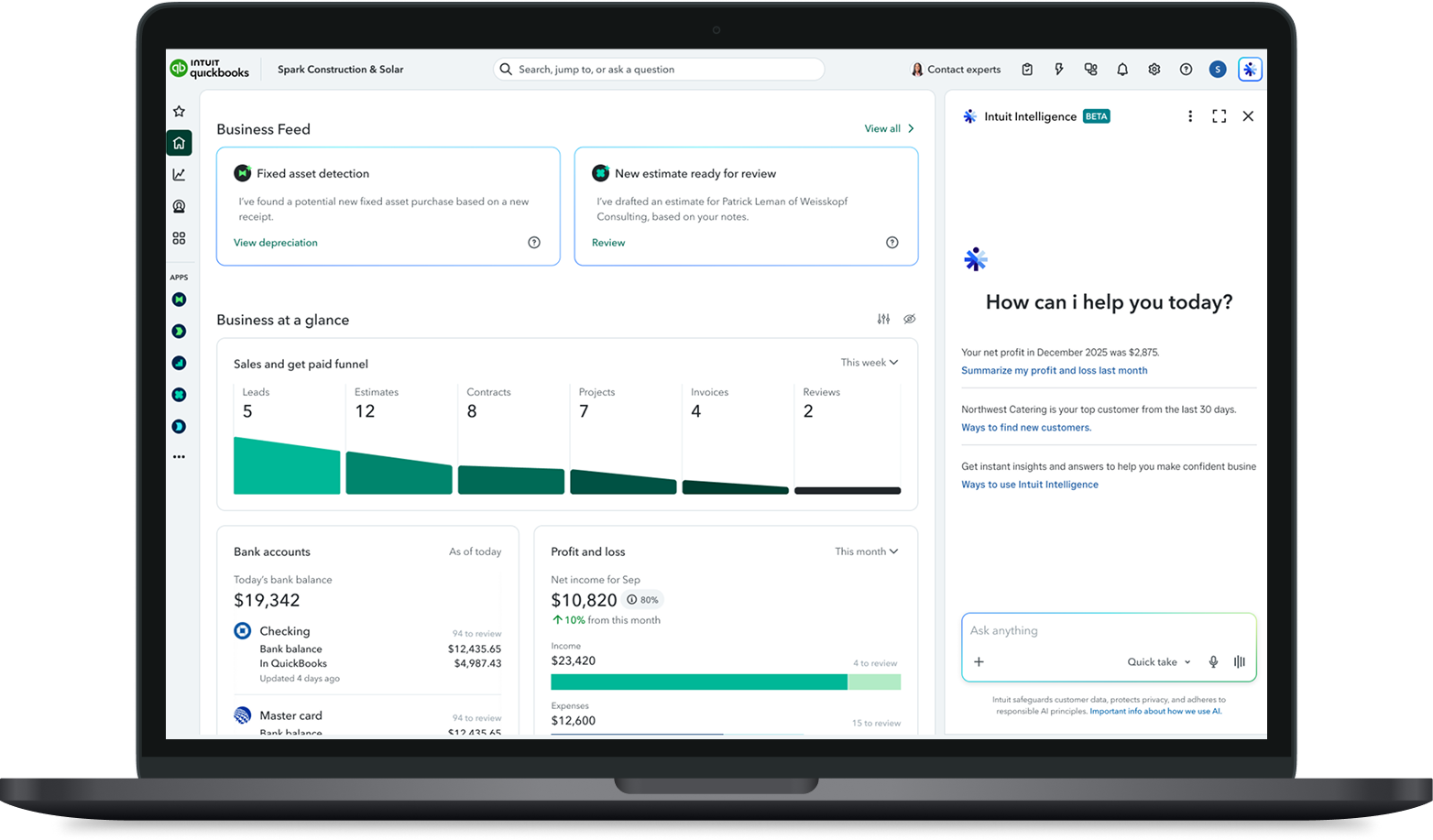
Intuit Intelligence conversational AI experience for QuickBooks shown across mobile and web
Intuit Intelligence Logo

Intuit Intelligence

by John Wayne Hill

Designing the conversational AI experience for QuickBooks, from a one-week vision sprint to a product used by millions of small businesses.

Overview

As a Product Design Manager at Intuit, I led the design team responsible for QuickBooks' AI experiences within the Global Business Solutions Group's AI Acceleration team. When leadership decided QuickBooks needed a single, coherent vision for conversational AI, I led and personally designed a one-week sprint to define it. What began as a provocative vision exercise, on a fast and very public deadline, became the foundation for Intuit Intelligence, now shipped to all QuickBooks customers.
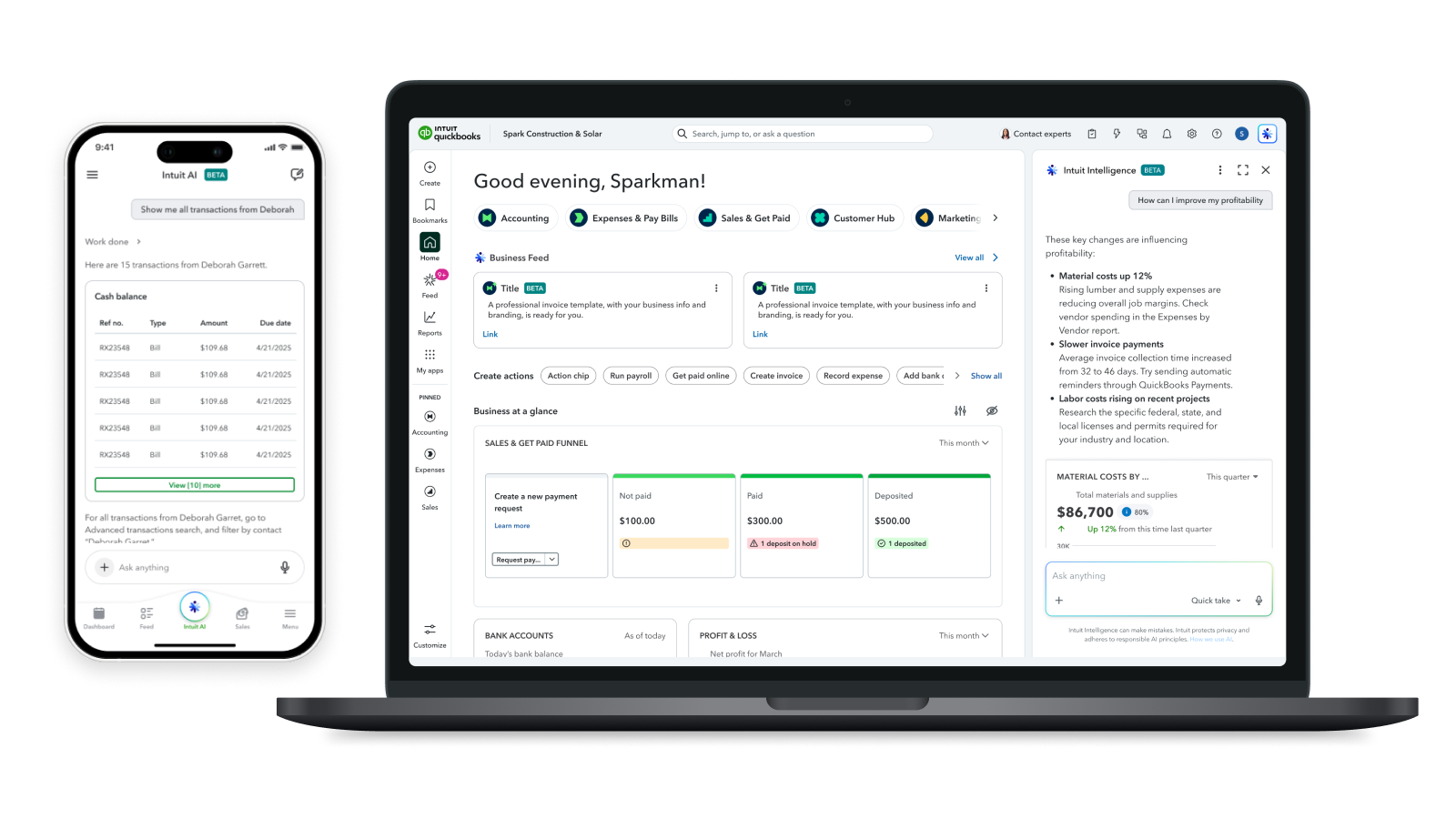
Intuit Intelligence conversational AI experience shown in context inside QuickBooks
Intuit Quickbooks

Problem

  1. QuickBooks customers had no clear place to go for open-ended help, explanations, or strategic business advice. They only saw narrow, task-specific tools.
  2. AI support inside QuickBooks felt fragmented and unclear, with multiple agents customers didn't know how to use, sometimes forcing them to leave the product entirely to get help.
  3. Customers felt frustrated, less confident in their decisions, and like they were wasting time switching between tools.
  4. We needed a clear, discoverable, and trustworthy entry point to general-purpose AI inside the core QuickBooks experience.
  5. The solution had to work across many surfaces without disrupting the workflows customers already relied on.
  6. And it had to go from a blank page to something presentable to the entire company in under a week.
illustration of a person seeking answers from an AI on screen
How it started

3 Days In

The project started with a problem of credibility. Leadership had seen an AI vision that the organization couldn't actually deliver on, so they turned to my broader team and asked us to step up. The question on the table was direct: could we deliver a ChatGPT-quality AI experience inside QuickBooks, grounded in each customer's own business data?

I led a small, all-in team into a one-week sprint: one staff product designer, one product manager, three engineers, and myself as the design lead. We attacked the problem from every angle at once, coming together several times a day to converge. On day three, the stakes changed. The CEO wanted to show this at the State of the Company, that Monday. We spent the rest of the week turning a provocation into a story the entire company could rally behind, and we made the deadline.

The Bar

Experience Principles

Before touching pixels, I established a set of experience principles to drive the concepts and hold the quality bar for the many teams that would build on top of this work:

  1. Never start with a blank canvas. Always provide contextual prompts, suggestions, and starting points so customers never face an empty chat wondering what to ask.
  2. Use local context whenever possible. The AI should know what page a customer is on and what they're likely trying to accomplish.
  3. Let customers change data sources. Give people control and transparency over what information the AI is drawing from.
  4. Make it easy to reach done-for-you flows and agentic skills. The chat should connect directly to actions, not just answers. Customers should move from question to completed task.
  5. No dead ends. Every response should lead somewhere: a deeper explanation, a related action, or a connection to a live expert.
illustration of a person checking off a list of experience principles
System

The Framework

Central to the design was a chat framework operating at three levels:

Global access for history, continuity, and ease of use, available anywhere in QuickBooks.

Local access at the page level, for context and inquiry tied to what the customer is looking at.

Hyper-local access for specific, in-context questions right where they arise.

This framework let the AI meet customers where they already were instead of forcing them to go find it.

diagram of the global, local, and hyper-local chat framework across QuickBooks

The chat framework operated at three levels: global access for history and continuity anywhere in QuickBooks, local access tied to the page a customer is on, and hyper-local access for specific questions right where they arise.

Outside-In Research

We ran outside-in research to answer a simple question: what AI tools were small business owners actually using, and how? We studied everything from general-purpose assistants to domain-specific tools embedded in productivity, e-commerce, and developer software. That work surfaced the patterns worth adopting and the traps worth avoiding around access points, context passing, and the balance between open conversation and guided task completion.

competitive audit of AI tools across general-purpose assistants and domain-specific software

We audited AI tools across general-purpose assistants and domain-specific software, mapping access points, context passing, and the balance between open conversation and guided task completion.

The Solution

Intuit Intelligence became the umbrella AI capability for QuickBooks: one immersive, functional experience that is both contextual and open-ended.

It gave customers a single, trustworthy place to think, ask, and get work done, with agents that handle real tasks and a path to a live human expert when one is needed. It was both reactive, answering questions across all of QuickBooks, and proactive, surfacing work done on the business owner's behalf.

Figma prototype with 3 flows. Message John Wayne for password.
In Production

What Shipped

The vision held up in production. A few of the patterns that made it real:

Intuit Intelligence useful empty state with business insights and starter prompts

A useful empty state. Business insights paired with starter prompts, so customers always have a helpful place to begin.

Intuit Intelligence grounding answers in a customer's own QuickBooks data

Grounded in your data. Customers trust Intuit with their data in ways they don't trust other AI companies, so the AI can tailor strategies to each business.

Intuit Intelligence surfacing insights and conversational nudges

Insights and nudges. Insights help customers improve the business; nudges keep the conversation from going stale.

Intuit Intelligence taking action on the customer's behalf inside the product

Action, not just answers. The AI takes action on your behalf, so you never leave the product to get things done.

Intuit Intelligence turning an uploaded document or photo into QuickBooks data

Documents to data. Upload a doc or snap a picture, and the data lands straight in your QuickBooks account.

Intuit Intelligence bringing in a live human expert when needed

Help when you need it. The AI knows when to bring in a live human expert to get more done.

Intuit Intelligence hyper-local homepage widget expanding into a full conversation

Widget to conversation. Hyper-local homepage widgets expand into deep conversations and insights, with clear next steps.

Intuit Intelligence generative, interactive charts for exploring business data

Interactive charts. Generative, interactive charts let customers explore their data in a brand new way, all in one place.

Extending to 20+ teams

A framework only holds the bar if other teams actually use it. So every Thursday I ran open Design Office Hours for any team building on top of Intuit Intelligence. Teams brought their real problems, and more often than not we designed together on the spot, applying the experience principles and the framework to their specific surface. It kept the work consistent and the quality high as the patterns spread across the org, and it's a big part of why they're now used by 20+ teams.

“This was the best design review I've ever attended in my career.”

A designer from another team, on Design Office Hours

Results

The provocation shipped, and the numbers followed, as we constantly iterated and shipped, sometimes daily.

  • 18.5% engagement
  • 4.5M+ total queries submitted
  • 34.6% repeat engagement
  • ~20% of customers upgrading for additional usage, a strong signal of product-market fit
  • Shipped to all QuickBooks customers, and expanding to Mailchimp as a true cross-product Intuit Intelligence platform
  • The interaction patterns established here are now used by 20+ teams across Intuit
illustration of a person holding a note with a checkmark and an arrow pointing up

“The entire set of patterns and experiences across mobile and web keep getting tighter and tighter. Seeing the end-to-end spotlight left me really excited about the product and customer experience we're working towards. Huge shout out to John Wayne for the killer walkthrough.”

Liam Greig, Director of Design, Intuit

Contribution

My Role

Led and managed the design team within AI Acceleration

Personally designed the vision state in a one-week sprint

Established the experience principles and chat framework that guided production

Partnered with the VP of AI Science, product management, and engineering leadership

Took the work from a provocative vision to a product shipped to millions

What's Next

Future Facing

We continue to iterate on the vision of an umbrella AI for Intuit. As the current product starts to expand to other product lines, we started provoking how to extend beyond existing interfaces and tightly bridging the gap between Artificial Intelligence and Human Intelligence. Below is a coded prototype showing what's possible.

A future-facing vision for Intuit Intelligence.

Additional Details In Person

Thanks for checking out my work! This is just a high-level overview for this particular case study. During in person interviews and presentations I go over additional details such as strategy, process, my direct contributions, and more. Get in touch if you'd like to learn more!

Contact Me

illustration showing a person on video call giving a presentation